Recognise the stage reached by the launch
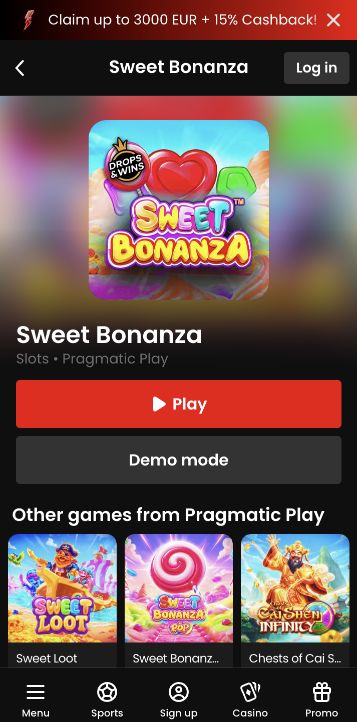
A slot launch has several visible stages: catalogue selection, the provider's loading screen and the playable interface. When opening a game through Zora on a phone, distinguish them before diagnosing a failure. Seeing the game's artwork does not mean that account access, balance synchronisation and controls are ready.
The website may display a game card immediately, then load a separate provider interface within the page. Each stage supplies different evidence. A card confirms that a catalogue item was selected; a loading screen shows an attempt to open it; a ready interface exposes the actual controls. None of the earlier stages proves that a stake was placed. This sequence is useful when the phone changes orientation or a browser toolbar hides part of the window, because the visual change can otherwise resemble a failed launch.
Check mode, currency and stake in the loaded game
Wait for the game to present its own interface and any required confirmation. Inspect the account balance, currency and selected stake before the first round. If a demo option is offered, keep it distinct from real-money mode; a simulated balance is not a deposit or a reward added to the account. Do not infer the mode from artwork alone.
Before the first action, read the mode label and the amount beside the stake control. A demo screen can show a large simulated balance that should not be confused with account money. In real-money mode, check the account currency and whether a previously used stake has been restored. The smallest coin icon and the total round charge may not be the same figure. Open the relevant information if the denomination is unclear, then return to the interface and inspect the final selected amount again.
Read the difference between loading and access messages
A loading bar that stops is different from a completed interface with a disabled spin button. The first may concern loading or connectivity; the second may show an account message, unavailable balance or another stated condition. Read the visible message before refreshing. Repeated reloads can erase the sequence needed to explain what happened.
For a loading problem, note whether the page still responds and whether an explicit error appears. For a disabled control, read the account or game message rather than assuming connectivity. A login requirement, availability notice and insufficient displayed balance describe different situations. Do not repeatedly refresh a completed interface without first checking whether an action was submitted. If no financial action occurred, returning to the lobby provides a clearer starting point for a new navigation attempt than opening several copies of the same game.
Treat a submitted round as an existing transaction
If a round has already begun, stop treating the screen as a fresh launch. Note the time and wait for its status or inspect the game history after reconnecting. A missing animation does not establish that no stake was accepted. Avoid tapping the start control again merely because the first outcome was not displayed.
Once a stake may have been accepted, the question changes from opening the game to identifying that round’s status. A closed panel, interrupted animation or phone lock does not establish cancellation. Preserve the time and any reference, reconnect to the intended account and inspect the recorded result. Avoid starting a fresh round merely to make the display respond. That creates a second event while the first remains unresolved, and the changing balance can make it harder to match each result to its own stake.
Report the stage and the exact title
For support, report the exact title, provider, launch stage and error wording. Also say whether any stake was submitted. This separates an access problem from a round-settlement question and avoids an investigation based on the wrong stage of the session.
A concise report can say that the catalogue opened, the provider loading screen appeared, and then a specific message stopped progress before any stake. If a stake was submitted, state that separately with its time and reference. Include the phone and browser, but do not include passwords or payment credentials. This level of detail separates navigation, access and settlement questions. The distinction is more useful than describing every failure as a game crash, because each stage has a different record and a different next check.