Identify the game’s timing model first
Instant games place important decisions close together on a small display. In Zora's instant category, inspect the loaded title's controls before starting: a stake field, a start button and a collect or cash-out action can have very different effects. The category name does not mean that every game uses the same timing model.
Instant is a catalogue category, not a single set of rules. A crash-style title, a mines-style grid and a small roulette format can place different decisions behind similarly prominent buttons. Open the rules and identify whether the next press starts a round, reveals an element or attempts to collect an existing result. A familiar colour or icon is not enough. On a phone, it is especially useful to locate the stake summary and the round-status message before the animation begins.
Separate next-round settings from accepted actions
Identify which controls configure the next round and which act on an accepted wager. In a crash-style game, for example, entering a value and successfully submitting a stake are separate events. Any automatic collection setting must be understood from the game's own rules and confirmation. Do not assume that a visible value proves an automatic action has been enabled.
Configuration fields describe an intended future action until the game confirms acceptance. For example, a number entered beside an automatic collection option should be read together with its enabled state and the rules governing when it applies. Do not assume that a setting survives closing the game or changing mode. Inspect it again before the next round. This is a control-reading check, not a method of predicting the game. Automatic options do not guarantee a profitable result or prevent a stake from being lost under the game’s rules.
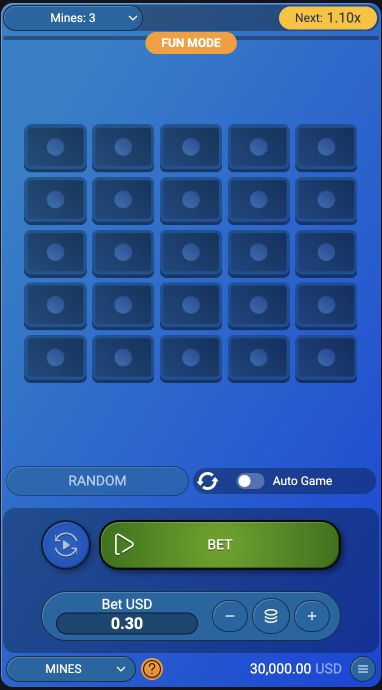
Read the total after every touch adjustment
Touch accuracy matters because nearby buttons can change the stake or start the next round. Review the total after using plus, minus or a quick-value control. If an animation or notification covers the button, wait for a clear view instead of guessing its position. A phone's vibration or sound is not a substitute for an accepted-action message.
A plus button, a preset amount and a repeat control can have different effects even when they sit close together. After any adjustment, pause to read the resulting total rather than relying on the number of taps. A notification can cover part of the interface, and rotation can move a control to another position. Wait until the layout is stable before acting. Device feedback such as vibration may confirm a touch was detected, but only the game’s own status can establish whether the requested action was accepted.
Use the recorded state when the connection lags
Connection delay can make the displayed moment differ from the server's accepted state. A late tap does not guarantee that a collection request was accepted at the value shown earlier. Read the recorded result and game history rather than calculating a claim from a frozen screenshot alone. No interface setting removes the possibility of losing the stake.
The moving picture is not a reliable timestamp for a disputed request when the connection is delayed. The server can have reached a different state from the last frame visible on the phone. Inspect the game’s accepted-action message and recorded round outcome rather than inferring a successful collection from the value shown immediately before a freeze. Do not repeatedly tap the same control to compensate for uncertainty. A second request may be irrelevant, rejected or associated with a different state, depending on the game.
Describe which action was attempted and acknowledged
If a control behaves unexpectedly, record the game, round reference and the action attempted. Distinguish an unsubmitted setup change from an accepted stake or a rejected collection request. Those are different events and require different explanations.
A useful record identifies the title, mode, round reference, intended action and displayed response. Distinguish changing a field, submitting a stake, attempting collection and receiving a result. If no acknowledgement appeared, say so instead of describing the action as confirmed. A screenshot can support what the interface displayed, but cannot by itself prove the server accepted a request at that instant. This precise account helps support investigate the actual event without turning a connection symptom into an unsupported claim about the game’s result.