Start with the section you actually need
Newin looks at Zora.bet from the reader’s first visit: finding a game, understanding the offer and locating the account features that matter before paying. The platform brings casino categories and sports into a shared navigation. This guide connects those sections with practical checks, so a promotional percentage is not mistaken for a ready-to-withdraw balance.
A visitor looking for slot mechanics needs different information from someone comparing sports markets. The casino lobby, live tables, instant games and sportsbook share a product brand, but their rules differ. Use the guide below to identify the relevant section before choosing a promotion.
Read the amount and the conditions together
The welcome figure is visible immediately. The comparison underneath explains why a catalogue card may use another percentage and why a promotional ceiling is not a cash gift. Payment and device details then complete the practical picture.
What makes Zora convenient to explore
Find a slot without browsing blindly
The useful part of the Zora slots catalogue is the choice of several browsing routes. You can start with a provider, a theme or a format such as Hold & Win, Mega-ways or Bonus Buys. That makes it easier to compare games with a shared feature instead of opening unrelated titles. New Slots gives another starting point when you want to inspect recent catalogue additions. Once a title is open, its paytable explains how that particular version works.
Compare a familiar game with a new format
For a first comparison, open Shining Crown and inspect the stake controls and symbol table. Then compare the presentation with Sweet Bonanza 1000. The point is to see how instructions, bonus features and the rhythm of play differ, not to assume that a more elaborate game pays more. A demo, where available, provides a practical space to learn the controls before deciding whether to use a real balance.
Live tables offer several kinds of experience
The Zora live casino combines traditional table categories with presenter-led shows. Roulette, blackjack and baccarat suit different rule preferences, while titles such as Money Time and Crazy Coin Flip offer a different presentation. The practical benefit is being able to compare table language, minimum stake and betting pace within one area. Choose using those details rather than a thumbnail alone, especially when several versions of a familiar table are listed.
Quick games are separated by mechanics
In the Zora instant games, Crash, Plinko, Mines and Dice & Hi-Lo are separate browsing groups. This is useful because the decisions made during a round are not the same: some formats involve an available cash-out action, others use a sequence of choices or a payout layout. Action and Arcades add further variety. Read one game’s instructions fully before switching formats; a similar visual style does not make two sets of rules identical.
Sports browsing can begin with the event or market
The football section at Zora provides a route into the sportsbook, where pre-match and live views serve different browsing needs. Winner, Total and Handicap let you compare different questions about an event rather than only its final winner. It is useful to read the market description before building a selection, then review the displayed price and settlement scope. Other observed categories include tennis, basketball, ice hockey, volleyball and esports.
Different rewards have different uses
The slots welcome offer sits alongside cashback and loyalty features rather than replacing them. Free spins are a game reward, Zora Coins are a separate reward unit, and a cash-labelled promotion has its own conditions. This variety gives you several features to examine, but they should be compared separately. The catalogue shows daily and weekly cashback, up to 1,800 Zora Coins daily and Level-Up Rewards; the individual card explains participation and crediting.
The browser route keeps the main sections close
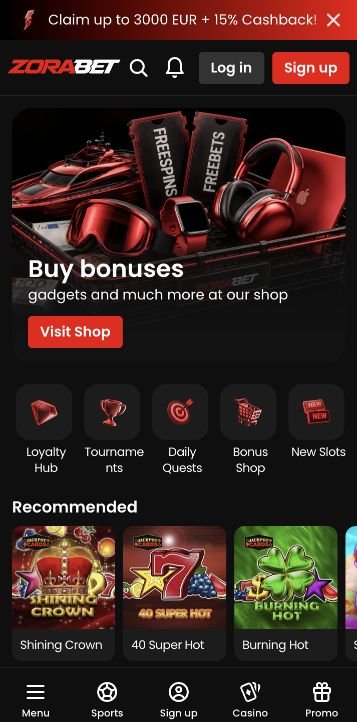
A phone-sized layout brings Casino, Sports and Promo into the bottom navigation. This is helpful when moving from a game category to an offer without searching through the desktop menu. On a larger screen there is more room for catalogue cards and tables. You can begin with the Zora.bet website in a browser and choose the language there; no confirmed native app is required for the access route described in this review.
Payments are easier to assess with a clear sequence
Before paying, open the cashier, choose the actual method and review its amount range and currency. After that, read the selected offer’s payment exclusions and save the transaction reference. For a question about verification or a withdrawal, the Zora support team is the appropriate destination. Keeping the method, bonus and transaction details together makes the question more precise than asking for a generic payout time.
| Category | Catalogue offer | Read the selected terms |
|---|---|---|
| Slots | 450% up to 3 000 € + 250 free spins | Read the selected terms |
| Instant games | 500% up to 3 000 € | Read the selected terms |
| Live casino | 500% up to 3 000 € | Read the selected terms |
| Sport | 500% up to 3 000 € | Read the selected terms |
Useful product links
Keep control of your spending
Decide in advance how much time and money you can afford to spend, and stop when that limit is reached. Bonus conditions can encourage additional play; they are not a reason to use essential funds or chase a previous loss. For account limits, breaks and self-exclusion, ask Zora support which controls apply to your account. All gambling can result in loss.
Frequently asked questions
View the offer · Zora.bet
Claim up to €3,000 + 250 FSReview basis: public Zora.bet screens, promotion details and general terms.