Start with a distinctive part of the title
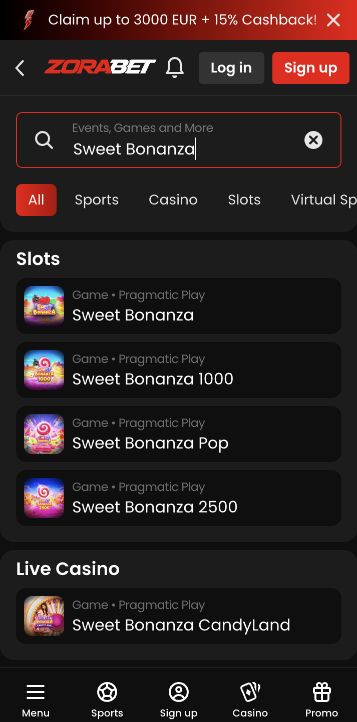
A short game search is more reliable than scrolling through every casino card on a phone. Start with the distinctive part of a title in Zora's catalogue, then inspect the result carefully. Similar artwork, sequels and live adaptations can make two different games look like the same choice.
A small-screen search works best as a narrowing process. Begin with a memorable, distinctive word rather than a broad theme such as gold or bonus, which can match many unrelated titles. Inspect the results before adding more words. The objective is to identify a product, not to select the first attractive image. A name associated with a slot can also appear in a roulette adaptation or live show, so the search result needs its surrounding category and provider information.
Match the title, provider and product category
Check the title and provider together. A familiar theme can appear in a slot, a live table and a game show, each with different rules. The available category is useful context, but the card alone is not a complete specification. Open the game's information before assuming its paylines, feature purchase options or volatility match another version.
Use three checks together: complete title, provider and game type. A sequel can change the grid, special features or rules even when the artwork resembles the original. A live adaptation can share a theme while using a completely different round structure. The catalogue card helps identify the candidate, but the information inside the opened game should establish its actual rules. Do not transfer an RTP figure, volatility description or feature price from a similarly named result to the version currently displayed.
Refine an empty search without forcing access
If the search returns nothing, simplify spelling and remove punctuation before concluding the title is absent. A search may use the game's original name rather than a translated description. Return to the relevant category and try the provider filter if one is available. Avoid switching countries or bypassing an availability message to force access.
When there are no results, remove an uncertain suffix or punctuation mark and try the distinctive word again. If the catalogue has a category or provider filter, check whether an old selection is narrowing the search unexpectedly. Clear only that visible filter rather than resetting the entire browser. An availability message is a separate outcome from a spelling mismatch. If the title is unavailable for the account, do not treat changing the country or creating another account as a search technique.
Inspect the full card after closing the keyboard
On a small screen, close the keyboard to inspect more than the first result. A partially covered card can hide a provider name or a variation such as a different edition. For a repeat visit, note the exact title and provider instead of saving only a cropped promotional picture.
Closing the keyboard can reveal provider text, edition labels and additional cards that were hidden below the fold. Read those details before tapping. On a repeat visit, a note containing the exact title and provider is more useful than an image with the label cropped away. If a favourite control is actually available in the account, inspect its effect and location; do not assume every public catalogue supplies one. A browser bookmark may return to a page without restoring the same game session.
Verify a returning favourite instead of assuming replacement
Catalogue visibility changes over time and does not guarantee launch access for your account. If an earlier game disappears, ask about that exact title rather than assuming a similarly named result is a replacement. The objective is to identify the correct product before committing a stake.
An older screenshot is evidence of a past catalogue view, not a permanent availability guarantee. If a title is missing, ask about the exact name and version, and state the category where it was previously found. A similarly named result may be a different game rather than an official replacement. Before committing a stake, confirm the rules of the current product. This final check protects against a common search error: recognising the theme while overlooking that the returned game uses a different format.